
Google Ads reports the click. ClickSheriff shows you what the click did next.
How many paid visits were the same browser coming back through your ad within a day. How much of your traffic could be measured at all. Where visitors reached for the phone. And, when you paste in a read-only script, how all of it lines up against your own Google Ads data. It does not block anyone, does not touch your campaigns, and never puts a figure on “money saved”.
WordPress · Google Search · No OAuth — nobody here is given access to your Ads account

A quiet dashboard is not automatically a clean result.
Before ClickSheriff can describe a traffic pattern, it checks whether Google Ads visits and click IDs are actually reaching this site.
Setup required
No usable Google Ads visit has been measured yet. Check that campaigns reach this site and that auto-tagging is on.
Learning
Measurement is working, but the sample is still small. ClickSheriff waits for about 30 paid visits across 7 days before drawing a conclusion.
Monitoring — nothing to act on
The sample is sufficient and no repeated pattern reached the evidence bar. This is not a promise that all traffic is valid; it means there is no basis to exclude an address now.
Action needed
One or more plausibly billed visits match a strong repeated pattern. Review the evidence before deciding anything.
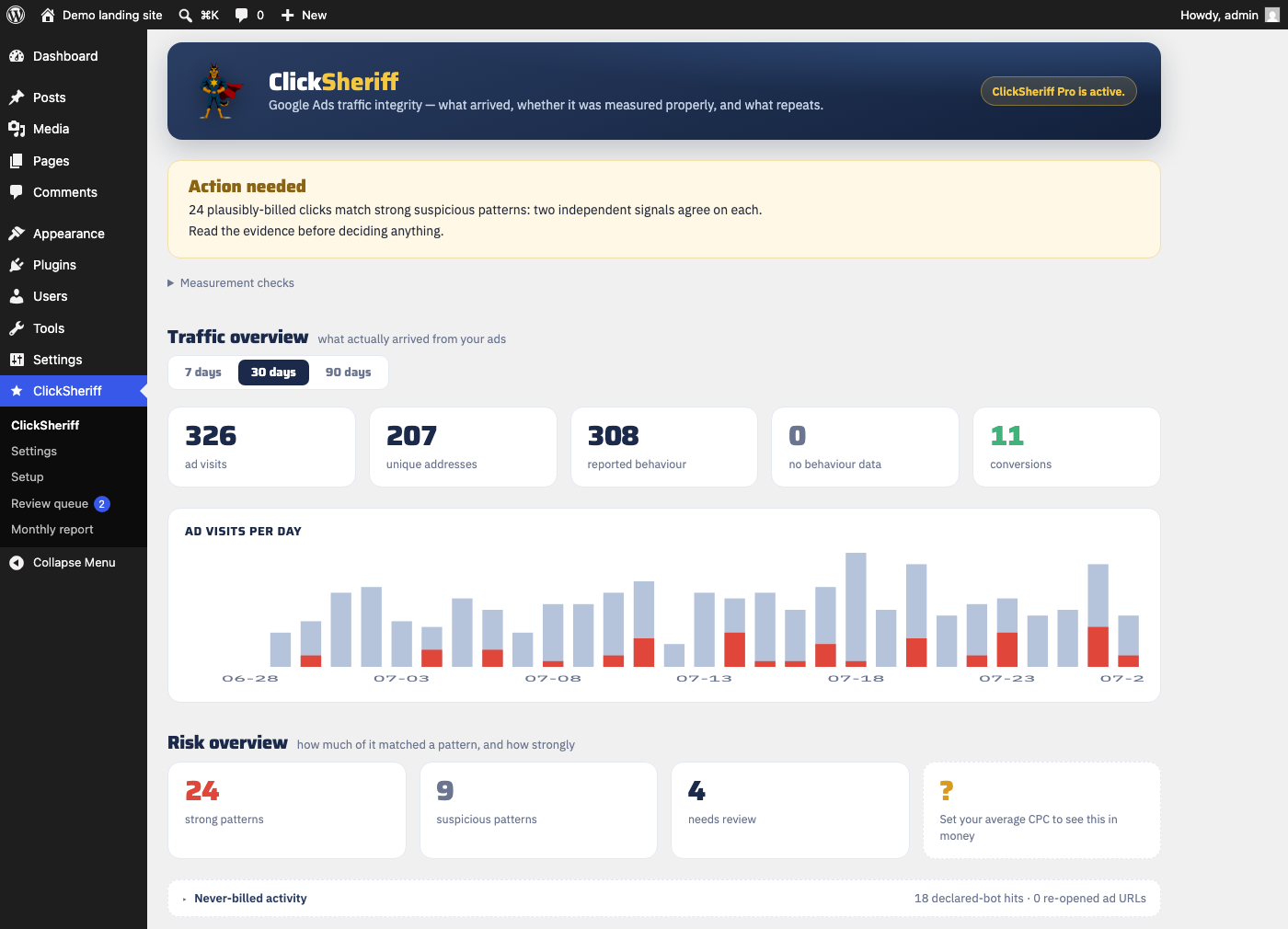
Measure first. Decide second.
Install on your WordPress landing page
ClickSheriff starts recording the paid visits that reach this site. It does not redirect, hide or turn away anyone.
Confirm the measurement chain
Turn on Google Ads auto-tagging and confirm that a Google click ID arrives with a paid visit. The Setup screen shows exactly what is missing.
Review a pattern only when there is enough evidence
If independent signals repeat, ClickSheriff shows the finding and its limits. You decide whether to keep monitoring, reject it, or approve an address for export.
What has to be true before any of this works
- The landing page runs WordPress and the plugin is active on it.
- Auto-tagging is on in Google Ads, so a paid click carries a Google click ID.
- At least one paid visit has actually arrived. No paid visits is “no result”, not “clean traffic”.
- The sample is large enough — roughly 30 paid visits across 7 days. Until then the dashboard says Learning and asks you to do nothing.
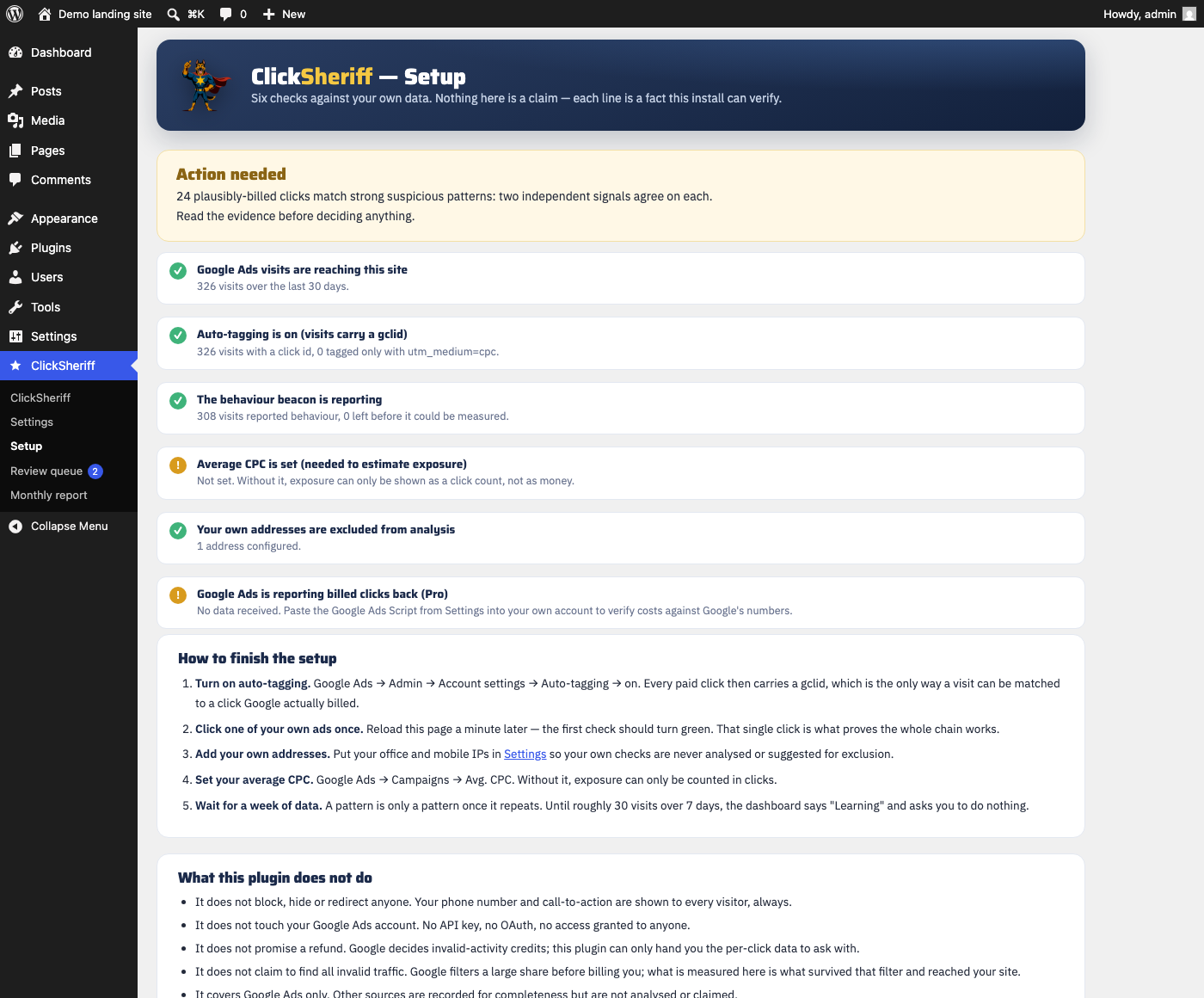
How often the same browser came back in through your ad.
Google mints a fresh click ID every time someone clicks your ad, so an account report counts those entries as separate clicks and cannot tell you they came from one browser. Your own site can: the session cookie is still there. ClickSheriff counts the extra entries and shows how many sessions had four or more.
Counted where it is countable
Only on click IDs Google issues once per click. The aggregated gbraid and
wbraid IDs repeat by design on separate clicks, so they are left out rather than
counted twice.
A floor, not a total
The count follows a 24-hour cookie. Clearing cookies, incognito, a different browser or a different device all start it again. The real number can only be higher, never lower — which is why we do not dress it up as a total.
Not a verdict
An interested customer who compares prices and comes back through the ad lands in this figure too. It does not identify a person, does not show that Google charged for the entries, and does not convert into an amount of money. The dashboard says so next to the number, every time.
A finding is a pattern in your traffic — not proof and not a bill.
ClickSheriff combines network origin, repeat timing across days, and on-page behaviour. A strong finding requires independent signals to agree. The evidence view also shows counter-evidence, including reasons not to overreact. Browser profiles are shown to you, but they never score a visitor: the profile identifies a browser model, not a device, and on the pilot account the visitors it kept flagging turned out to be the ones who bought.
Two signals must agree
A single signal is never enough. One datacenter address, one fast bounce, one automated user-agent or one missing click ID cannot produce a strong finding on its own.
The case against it is shown too
Conversions from the same address, real time spent on the page, and how few days it actually appeared on are listed alongside the signals that fired.
Nothing happens without you
Nothing is sent to Google Ads automatically. Only an administrator can approve or reject a suggested address, and every decision is recorded with who made it and why.
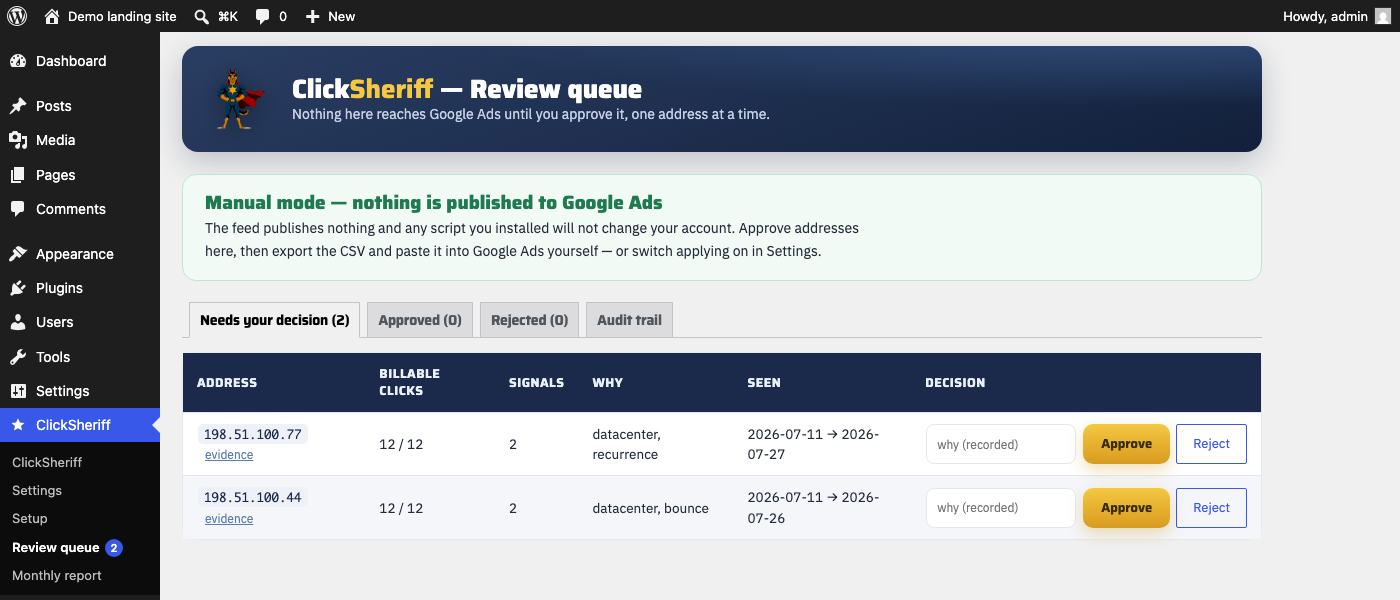
Start with the answer you need. Upgrade when you need depth and workflow.
Free
- Measurement health and setup guidance
- Full scoring and traffic-integrity verdict
- 7- and 30-day views
- Masked addresses and finding counts
- Monthly traffic-integrity report on screen
- No credit card
Pro
- Full IP addresses and 90-day history
- Evidence cards with supporting and counter-evidence
- CSV: findings, Google investigation evidence, approved list
- Review queue with approve, reject and revoke audit trail
- Email and Telegram alerts for strong patterns
- Monthly traffic-integrity report as a file
- Optional reconciliation against your Google Ads data, when its script is configured
Pro is finished but not yet on sale: there is no checkout and no automatic licence delivery, so we are not taking money for it. Install Free now — it is the same detection engine. Tell us if you want it and we will let you know when it is purchasable.
Measurement and scoring continue in Free. Pro unlocks the additional context and workflow; it does not unlock a different detection engine.
Who this is for — and who it is not for.
A good fit
- One WordPress landing site with Google Search traffic
- Wants clear measurement coverage before acting
- Will read the evidence before adding an exclusion
- Comfortable that the honest answer is often “nothing to act on”
Not a fit
- Needs to turn away visitors or alter pages
- Needs cross-platform, MCC or agency automation
- Wants a tool that declares every bad click “fraud”
- Wants a guaranteed refund from Google
Six sentences you will not find on this page.
Every one of them is standard in this category. Each is either unprovable from a website, or something this product does not do. If you need a tool that says them, we are not it.
“Saves up to 30% of your budget”
A saving means spend that did not happen. ClickSheriff blocks nothing, so nothing is prevented and there is no saving to count. A figure built from blocks × your average cost per click is arithmetic, not a measurement.
“Blocks bots and competitors”
It never blocks, hides or redirects a visitor. Your phone number is shown to everyone, always. A false positive here costs you a customer, and we have already watched a signal flag the people who bought.
“Gets your money back”
Only Google decides invalid-activity credits. What this can do is hand you the per-click record to ask with — and it filters a large share before billing you anyway, without us.
“Identifies the device behind the click”
A browser profile is a hash of screen size, timezone, language and user-agent. Identical phones produce identical profiles. It names a model, and we label it that way on the screen.
“Finds the clicks Google missed”
We cannot see which clicks Google charged for unless you connect your own account data, and even then a registered click is not proof of a billed one. Anything else would be a guess with a currency symbol in front of it.
“Expect X% of your traffic to be fraud”
Numbers from our pilot account describe that account. Your niche, your campaign types and your month are different, and a benchmark borrowed from someone else is how a dashboard talks people into decisions.
Straight answers.
Does ClickSheriff block visitors or change my ads?
No. It does not hide, redirect or alter what a visitor sees, and it does not connect to your Google Ads account. An administrator can later export an approved list and decide what to do in Google Ads.
Why does the dashboard say Setup required or Learning?
These are honest coverage states. No paid visit is not a clean result, and a small sample is not enough to justify action. The setup page shows exactly which link in the chain is missing. Learning ends at roughly 30 paid visits across 7 days.
Does a strong finding prove click fraud?
No. It is a repeated pattern in the traffic this site measured. The evidence view shows both the signals that fired and the reasons not to overreact — conversions, real time on page, how few days it actually appeared on. Review both before making a decision.
What does Free include?
Measurement health, the full scoring engine, masked addresses and 30 days of dashboard history. It is useful even when the answer is "there is nothing to act on" — that answer is the point.
What does Pro add?
Full addresses, 90 days of history, evidence cards, CSV exports, alerts, the review workflow and a monthly report. Measurement and scoring never stop when a trial ends, and no data is deleted.
Can I get Google Ads money returned?
Google applies its own invalid-activity protections and decides on its own whether an investigation results in a credit. ClickSheriff can export the per-click data from your site to support your own review or request. It does not promise a credit and cannot influence that decision.
Which campaigns are in ClickSheriff's scope?
The supported scope is Google Search traffic reaching a WordPress landing page. Performance Max, Display, Shopping, YouTube, Meta and Microsoft fall outside that scope. Microsoft-tagged visits may be recorded as experimental data and do not affect the Google Ads measurement verdict.
Do I need to connect my Google Ads account?
No, not for Free measurement. Auto-tagging needs to be on in Google Ads so a paid visit carries a Google click ID. Pro cost reconciliation is optional and requires you to configure the supplied Google Ads script inside your own account.
Google Ads traffic quality, explained.

Give your paid traffic a clear baseline.
Install Free, confirm that measurement works, then let the evidence tell you whether anything needs your attention.
Install ClickSheriff Free